
2020年5月19日
テレワーク機能 リモート対象PC設定手順
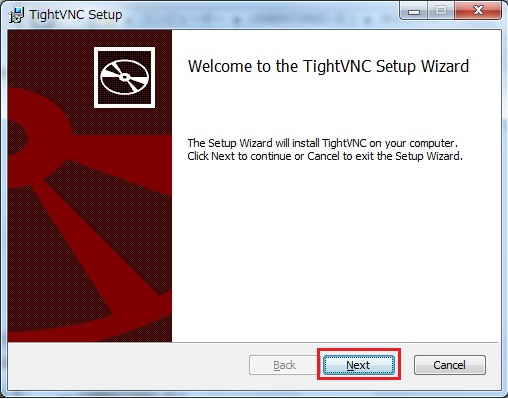
- ダウンロードした「VNCServerInstaller.exe」をダブルクリックしてください。
インストーラが起動します。 - 「Next」をクリックしてください。
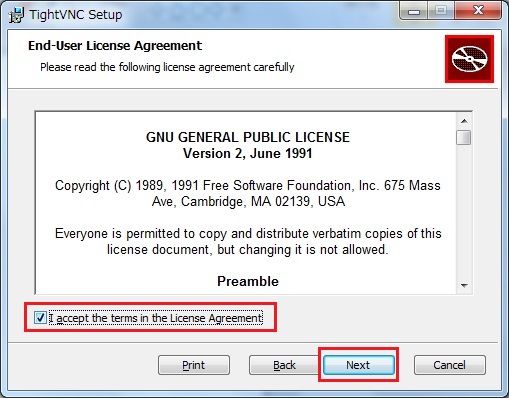
- 「I accept the terms in the License Agreement」をチェックし、「Next」をクリックしてください。
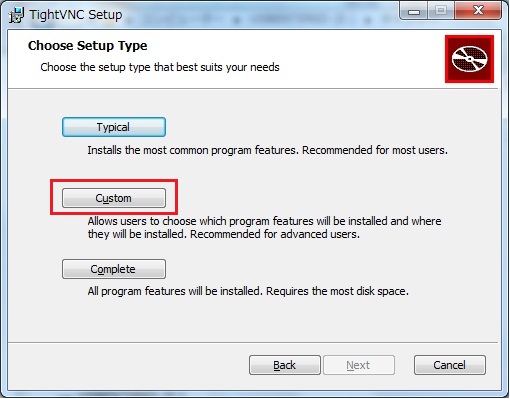
- 「Custom」をクリックしてください。
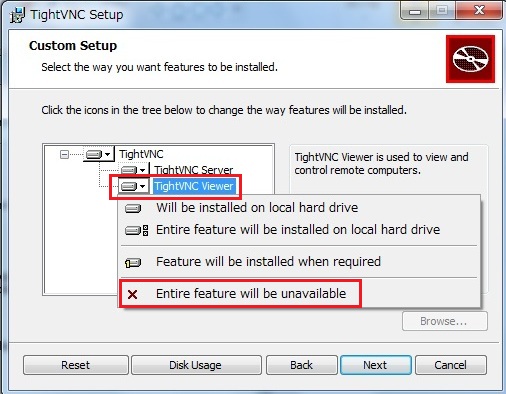
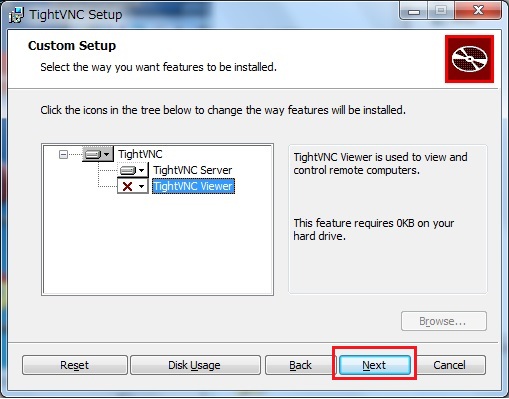
- 「TightVNC Viewer」をクリックし、「Entire feature will be unavailable」をクリックしてください。
- 「Next」をクリックしてください。
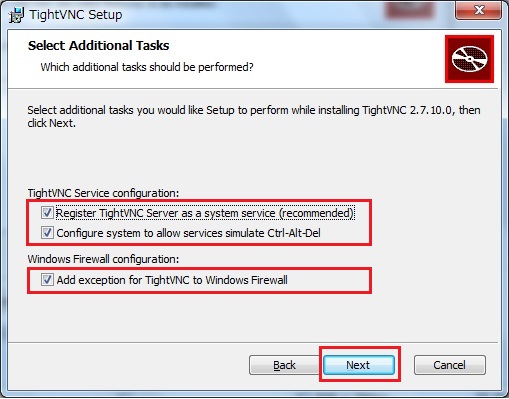
- 「Register TightVNC Server as a system service (recommended)」「Configure system to allow services simulate Ctrl-Alt-Del」「Add exception for TightVNC to Windows Firewall」にチェックし、「Next」をクリックしてください。
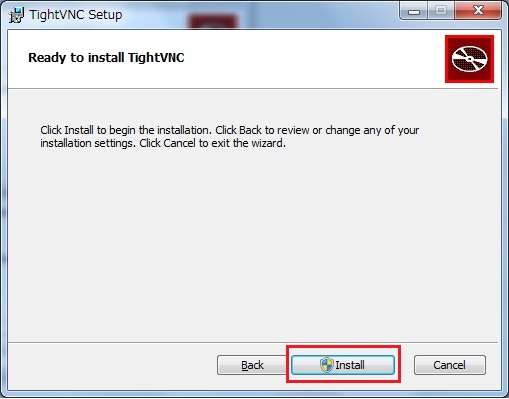
- 「Install」をクリックしてください。
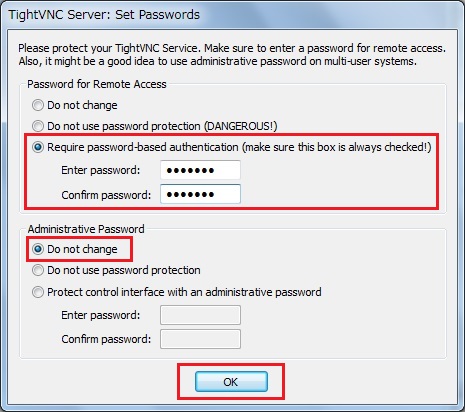
※ユーザアカウント制御のダイアログが表示される場合があります。その場合は「続行」してください。 - 「Password for Remote Access」の欄の「Require password-based authentication (make sure this box is always checked!)」を選択し、Alritのテレワーク画面で設定したパスワードを入力してください。また、「Administrative Password」の欄は「Do not change」を選択してください。入力が完了したら「OK」をクリックしてください。
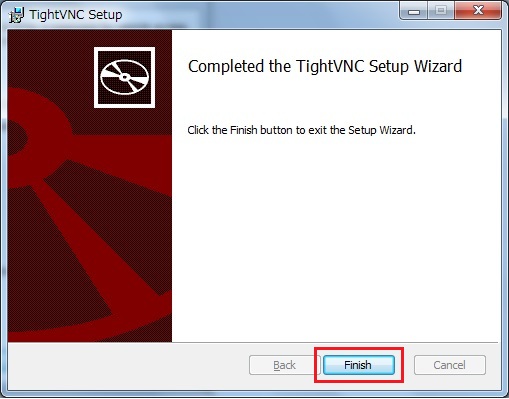
- 「Finish」をクリックしてください。
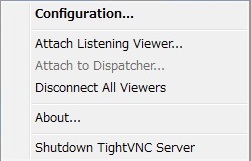
- タスクトレイのアイコン
 を右クリックし、メニューを表示してください。
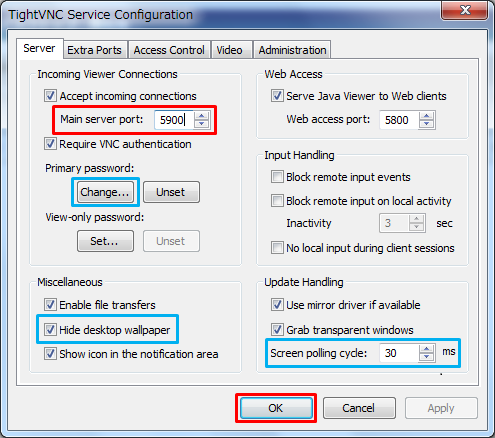
 - 「Configuration...」をクリックして、設定画面を表示してください。
-
「Main server port:」にAlritのテレワーク画面で設定したポートを入力し、「OK」をクリックしてください。
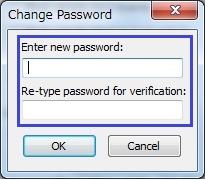
- Alritのテレワーク画面で設定したパスワードが変更された場合は、「Changes...」をクリックしてChange Passwordダイアログを開き、パスワードを再入力してください。
- 「Hide desktop wallpaper」にチェックをつけた場合、デスクトップの背景画像が無効化され、リモート速度が速くなります。チェックをつけることを推奨します。
- 「Screen polling cycle」で画面の更新頻度を指定できます。ここに指定する値が小さいほどリモートの操作は滑らかになりますが、CPUの消費は大きくなります。PCのスペックに応じて設定してください。(推奨値:30)
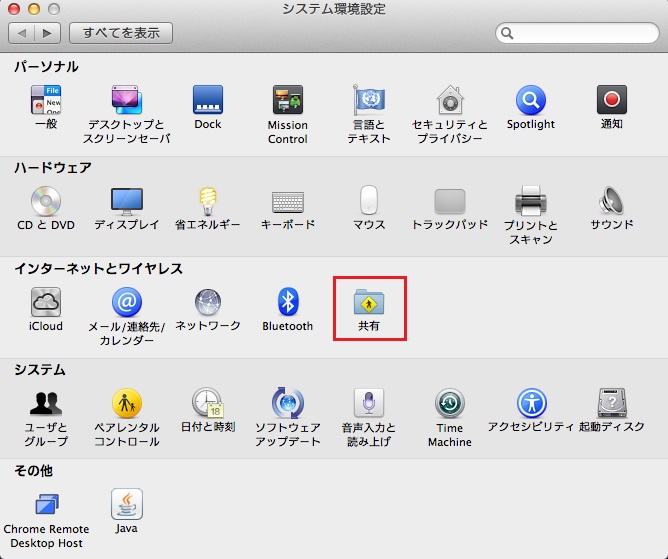
- システム環境設定を開く。
- 「共有」をクリックしてください。
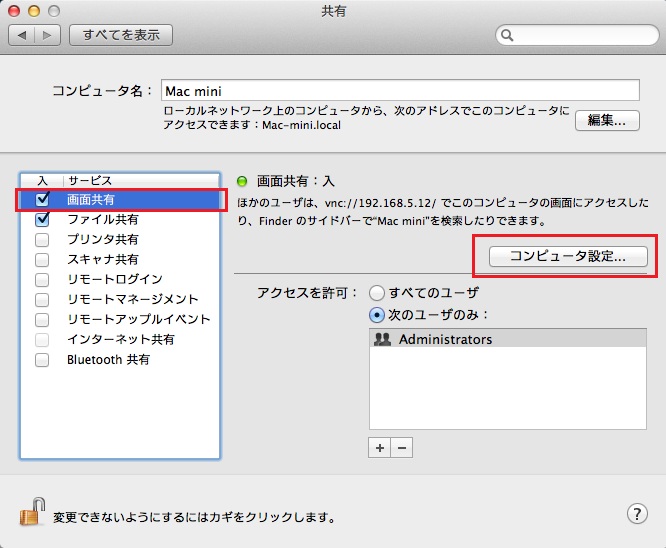
- 「画面共有」をチェックし、「コンピュータ設定」をクリックしてください。
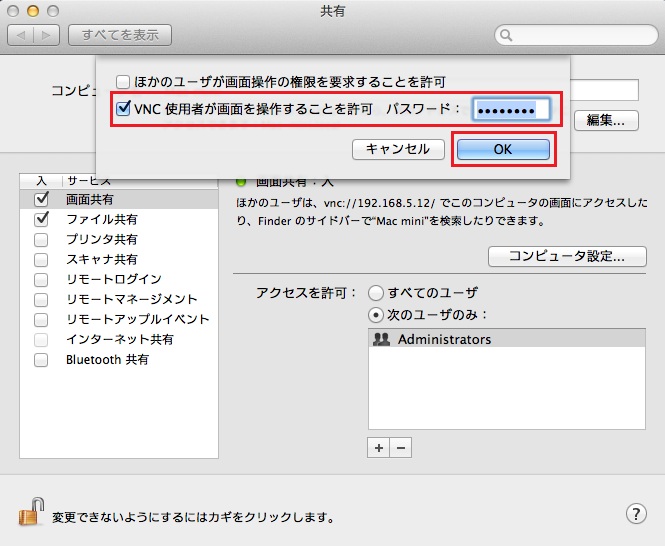
- 「VNC使用者が画面を操作することを許可」をチェックし、「パスワード」にAlritのテレワーク画面で設定したパスワードを入力し、「OK」をクリックしてください。
- ポートは固定で「5900」です。
Alritの「テレワーク機能」を利用してPCへリモート操作を行う際は、リモート対象となるPCに指定のソフトウェアの設定が必要となります。
下記よりソフトウェアの設定方法をご案内致します。
・Windowsの場合
・Macの場合
※リモート対象となるPCには、IPアドレスを固定する、またはAlritのDHCP機能「MACアドレスによるIP割り当て」を利用し、同じIPアドレスが割当たる設定にすることを推奨します。
Windowsの場合
<インストーラのダウンロード>
「ダウンロード」ボタンをクリックして、インストーラを管理PCのデスクトップに「保存」してください。
※「実行」ではなく、「保存」を選択

<インストール手順>
-VNCServerInstaller.exe
-VNCServerSetup.vbs
-「32bit」フォルダ
-「64bit」フォルダ
<接続設定>
以上で設定は完了です。
リモート接続時に操作がうまくできない場合はこちらをお試しください。
Macの場合
※サポート対象バージョンは、MacOS10.11以降です。
<接続設定>
お問い合わせ窓口
ラディックステクニカルサポートセンター
フリーダイヤル:0120-558-955
WEBからのお問い合わせはこちら:https://www.radix.ad.jp/support/index.html
《受付時間》月~金…9:00~19:00 土曜…9:00~17:00
※営業時間内にお問い合わせください。